

Can I shoot straight with you for a second? Every service business I’ve ever worked with breaks at roughly the same place. Eight employees. About $1.5M in revenue. Around 200 active clients on the books. The owner is working 60-hour weeks, dropping balls in the inbox, missing follow-ups, and quietly burning out while the business technically grows.
That ceiling is real. And it’s not a people problem. It’s a system problem.
AI for service businesses is the thing that finally takes the ceiling off. Not the chatbot on your homepage. Not the “AI-powered” badge on some SaaS landing page. I’m talking about a stitched-together operating system that runs intake, scheduling, follow-up, project communication, billing reminders, and retention. The whole machine. The places AI fits, the places it doesn’t, and what it actually costs to wire it up.
In the next 3,000 words, I’m going to walk you through the exact OS we build for service businesses at The Reach Company, the 6 layers it has, where AI takes over, where humans must stay, and what kind of revenue ceiling-breaker you can expect when it’s running. No fluff. No hype. Real numbers, real tools, real client outcomes.
The Real Reason Service Businesses Hit a Ceiling at $1.5M
Here’s the rub. Most service businesses don’t fail because they can’t get clients. They fail because they can’t service the clients they already have without the owner becoming the bottleneck.
I’ve watched this exact movie probably 40 times. Owner does great work. Word of mouth grows. Calls start coming in. They hire help. The help can do the work but can’t do the coordination. The owner becomes a glorified dispatcher and customer service rep. Revenue plateaus right around $1.2M to $1.6M. Sometimes for years.
Look at the math. At 200 active clients, even if each one only needs 12 touchpoints a year (intake, scheduling, reminders, follow-up, invoicing, review request, retention check-in), that’s 2,400 touchpoints. About 200 a month. Roughly 10 a workday. Every one of those touches takes 5 to 20 minutes when you factor in context-switching. That’s 2 to 6 hours of pure admin per workday, before you do an ounce of actual client work.
That’s the ceiling. And every service business owner I know has hired their way around it at some point. They hired an admin. Then a project manager. Then an ops person. Each hire bought them 6 to 12 months of breathing room, then the ceiling moved up a notch and bumped into them again.
The reason: humans don’t scale linearly. Coordination cost grows faster than headcount. Add a 9th employee and you don’t get 12.5% more output. You get more meetings, more Slack threads, more “did anyone follow up with Karen?” The system collapses under its own weight.
AI doesn’t have that problem. AI doesn’t get tired, doesn’t forget, doesn’t context-switch, doesn’t need a 1:1, and doesn’t quit. Used correctly, it gives you the equivalent of 2 to 3 full-time admins for the cost of a single GoHighLevel subscription and a handful of API calls.
That’s the real reason to care about AI for service businesses. Not because it’s trendy. Because it’s the only thing that breaks the ceiling without breaking your P&L.
AI as an Operating System: What I Actually Mean
Let me get this outta the way. When most people say “AI” they’re thinking ChatGPT. Open a window, type a prompt, get an answer. That’s a useful tool. It is not an operating system.
An operating system, in service business terms, is the layer that sits between your team and the chaos. It receives information (a form fill, a missed call, a calendar request, a paid invoice), routes it to the right place, triggers the right next step, and tells the right person what they need to know at the right time. The OS on your computer does this for software. A service business OS does it for client work.
For 30 years, the “OS” of a service business was a notebook, a wall calendar, and the owner’s memory. Then it became QuickBooks, a CRM, a separate scheduling tool, an email marketing platform, and roughly 14 spreadsheets nobody fully understands. Most service businesses still run on that mess.
AI changes the equation in two specific ways.
First, it stitches. A few years ago, getting your CRM to talk to your scheduling tool to talk to your billing system required a developer or Zapier black magic. Now you can hand GoHighLevel, Make.com, or n8n a plain-English description of what you want and it builds the workflow. The friction between systems collapsed.
Second, it judges. This is the part that actually matters. Old automations were dumb pipes. They moved data from A to B. They couldn’t read the incoming email and decide whether it was a hot lead, a billing question, or a complaint. AI can. That single capability turns a static workflow into a system that adapts.
Stitching plus judging equals an operating system. You feed inputs in. The system reads, routes, drafts, schedules, and reminds. Your humans handle the 20% that requires actual judgment, relationships, or hands-on work. The other 80% runs without supervision.
That’s the OS. That’s what AI for service businesses actually is.
The 6 Layers of a Service Business AI Operating System
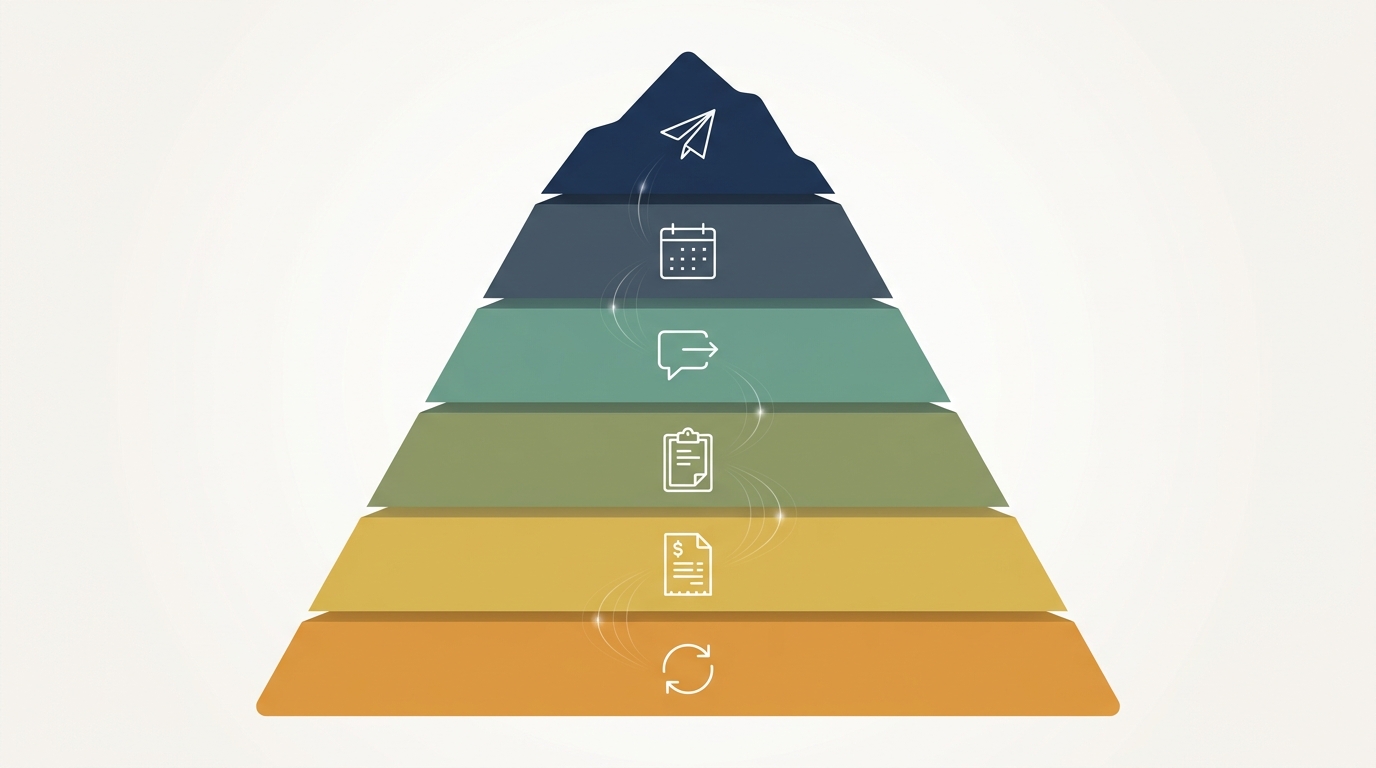
When we build one of these for a Reach Company client, it has 6 layers. They stack on top of each other in the order leads and clients move through the business. Skip a layer and the system leaks. Get all 6 working together and you have an OS.
Layer 1: Intake
The first 5 minutes after a lead reaches out are worth more than the next 5 days combined. We tested this with a roofing client in Atlanta. Leads that got a response within 5 minutes converted at 27%. Leads that got a response at 60 minutes converted at 8%. After 24 hours, 1%.
AI’s job at intake: respond instantly, qualify the lead with 3 to 5 questions, book them onto the calendar if they’re a fit, and drop the unqualified ones into a nurture sequence so you don’t waste your sales team’s time.
Tools: GoHighLevel for the inbox, calendar, and SMS. OpenAI’s GPT-4o (via API) for the qualification logic. Twilio for the texting layer.
Human stays: Reviewing the AI-qualified bookings every morning, taking the high-value sales calls.
Layer 2: Scheduling
This is the boring one that breaks everyone. Calendars get over-booked. Drive times get ignored. Two technicians get assigned to the same job. Clients no-show because nobody confirmed.
AI’s job: read the job type, match it to a technician with the right skills, check the calendar, account for drive time, send confirmation texts at the right intervals, reschedule no-shows automatically.
Tools: GoHighLevel’s calendar plus its workflow builder. For multi-tech routing with drive-time logic, we layer in Jobber or Housecall Pro and let the AI assistant in the middle make the assignment decision.
Human stays: Handling the edge cases. The “my elderly mother is the client and can only do Tuesdays” cases.
Layer 3: Follow-Up
This is where 90% of service businesses leak money. Lead comes in, gets a quote, doesn’t book. The salesperson means to follow up. Doesn’t. Lead goes cold. Closes with the competitor 3 weeks later.
AI’s job: track every quote, send personalized follow-ups at day 1, 3, 7, 14, and 30, change the message based on what the lead said in the original conversation, escalate to a human if the lead replies with anything that isn’t a clean yes or no.
We built one of these for an HVAC client last year. Their quote-to-close rate went from 19% to 31% in 90 days. Same quotes. Same prices. Just nobody falling through the cracks.
Tools: GoHighLevel for the sequence delivery. GPT-4o for drafting personalized messages off the original conversation transcript. The salesperson gets a daily digest of who replied and what they said.
Human stays: Closing the call. Negotiating. Handling the “I need to talk to my spouse” objection.
Layer 4: Project Communication
The middle of a service engagement is where clients form an opinion of you. Ironically, it’s also where most service businesses go silent. The work is getting done, so the owner figures the client is fine. They aren’t. They’re wondering if they got scammed.
AI’s job: send proactive status updates at every milestone, generate the update copy from the project notes, surface anything the client should know about, draft photos and videos into a clean update message.
Tools: GoHighLevel for the message delivery. We use Otter.ai or Fireflies.ai to capture project notes from team huddles, then AI summarizes those into client-facing updates.
Human stays: The actual project manager. The relationship. Approving the AI-drafted updates before they go out.
Layer 5: Billing Reminders
Service businesses lose 4% to 8% of revenue to receivables that age out, get forgotten, or get written off. Nobody wants to be the bad guy chasing payment. Nobody schedules it consistently. AI doesn’t have those feelings.
AI’s job: track invoice age, send escalating reminders, draft the reminder copy in the right tone (warm at day 5, firm at day 15, formal at day 30), surface accounts that need a human call.
Tools: QuickBooks Online or Stripe for the invoicing. GoHighLevel for the reminder delivery. GPT-4o for tone-adjusted drafting.
Human stays: The phone call when someone goes 45 days overdue. The relationship conversation when a long-term client hits a cash flow rough patch.
Layer 6: Retention
The cheapest client you’ll ever sell is the one who already bought from you. Most service businesses spend 95% of their marketing budget on new clients and 5% on the ones they already have. Backwards.
AI’s job: detect the signs of a client about to disengage (no opens, no replies, payment friction, dropped frequency), trigger a re-engagement sequence, surface at-risk accounts to the owner for a personal call, ask for reviews from the happy ones at exactly the right moment.
Tools: GoHighLevel for the contact scoring and sequences. Birdeye or NiceJob for the review automation. GPT-4o for the personalized re-engagement copy.
Human stays: The owner picks up the phone. Always. Retention is a relationship game, and AI’s job is to surface the moment. Not to replace the call.
The AHA: AI Doesn’t Replace Your Team. It Replaces What Your Team Hates
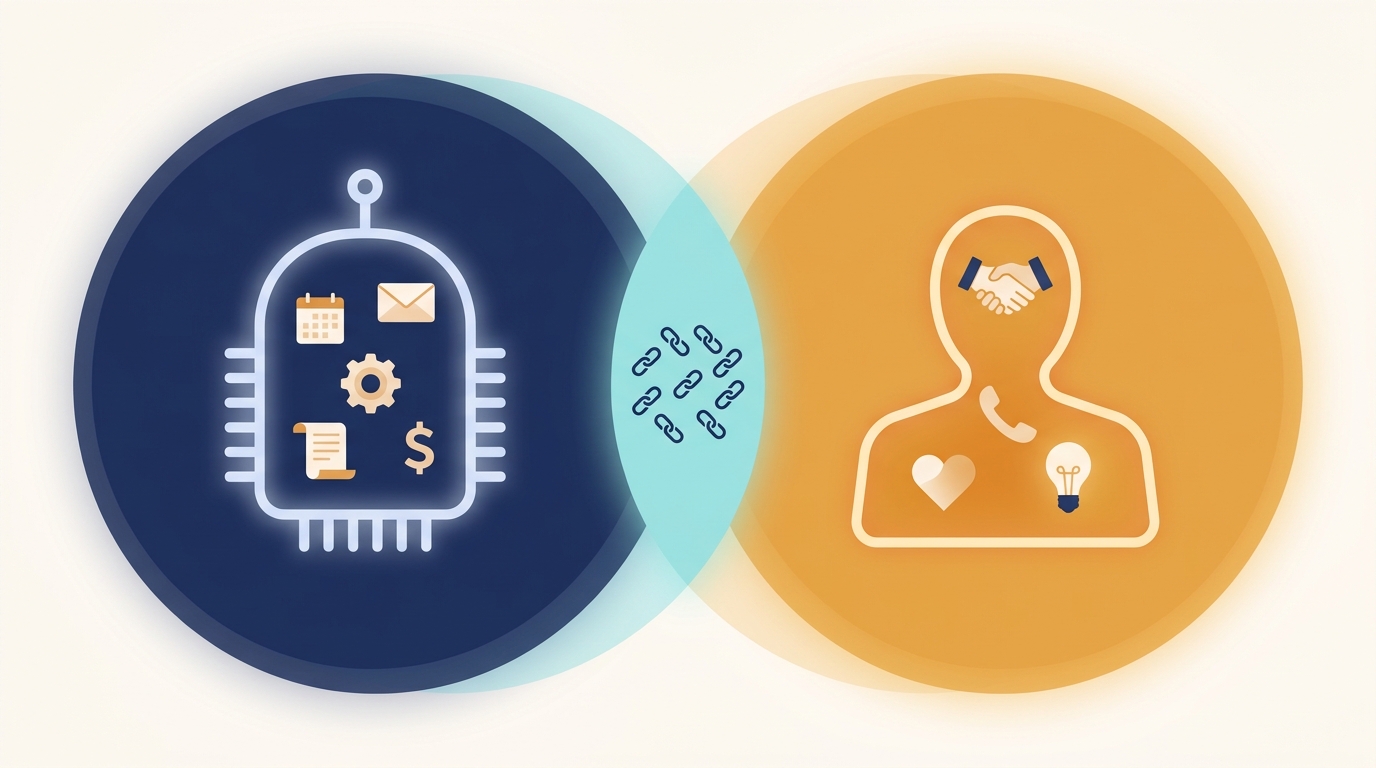
This is the section to screenshot. Read it twice.
The fear every service business owner has when I bring up AI is: “Am I about to fire half my team?” The honest answer is no. The smart answer is the opposite. You’re about to give your team back the 60% of their workday they currently spend on tasks they hate.
Sit your project coordinator down for an hour and ask her what she actually does. She’ll say: chasing technicians for updates, retyping the same status email to 15 clients, hunting down invoices, scheduling follow-ups, fielding “where’s my technician?” texts.
She didn’t take the job to do that. She took the job to coordinate. The chasing, retyping, hunting, scheduling, and fielding is exactly what AI handles best.
When you implement an AI OS, two things happen.
One, you stop hiring around the bottleneck. You were about to hire a $52K admin. You don’t need to. The AI handles 80% of what the admin would have done. You still hire, but you hire for the work that actually moves the business. A senior tech instead of a junior admin. A salesperson instead of an inbox monitor.
Two, your existing team gets way better at their actual jobs. The project coordinator who spent 4 hours a day chasing updates now spends 4 hours a day actually coordinating: anticipating problems, building client relationships, reviewing budgets, training new hires. The job becomes the job again.
I’ve never had a Reach Company client lay anyone off after implementing an AI OS. I’ve had several stop hiring. I’ve had several promote people into the strategic role they were always supposed to be in.
Let that sink in. Let it really sink in. The AI doesn’t replace the human. It deletes the work the human shouldn’t have been doing in the first place.
Proof: What This Looks Like for a Real Business
Let me give you a specific example so this stops being abstract.
Atlanta-based commercial cleaning company. 11 employees. Doing about $1.4M when they came to us 14 months ago. Owner was working 65-hour weeks. Two crews. Roughly 180 active client locations. The classic ceiling.
Here’s what we built.
Layer 1 (Intake): GoHighLevel inbox capturing every lead from their website, Google Business Profile, and Facebook page. GPT-4o assistant asks 4 qualifying questions (square footage, frequency, current vendor, decision timeline), books qualified leads directly to the owner’s calendar, drops unqualified leads into a nurture sequence.
Layer 2 (Scheduling): Job assignment based on crew specialization (medical-grade vs. standard commercial), geographic routing to minimize drive time, auto-confirmations at 48 hours and 4 hours before service.
Layer 3 (Follow-Up): Every quote generates a 5-touch follow-up sequence over 30 days, AI personalizes each message based on the original conversation, salesperson gets a daily digest at 8am of new replies.
Layer 4 (Project Comms): Post-service photo updates auto-generated and sent to the client point of contact within 30 minutes of crew finishing. AI drafts the copy from the crew’s notes, the office manager approves.
Layer 5 (Billing): Stripe invoices auto-send, day 5/15/30 reminders go out at the right tone, accounts over 30 days surface on the owner’s daily dashboard.
Layer 6 (Retention): Quarterly check-in sequence for every active account. AI flags clients with declining engagement (no opens, no replies, missed scheduling). Owner gets a list of 3 to 5 calls to make every Monday.
Cost to build: roughly $14,000 over 90 days (our setup) plus $397/mo in software (GoHighLevel, Twilio, OpenAI API).

Results after 14 months:
- Revenue: $1.4M to $2.3M (64% growth, no new hires beyond replacing one departure)
- Owner hours: 65/week to 38/week
- Quote-to-close rate: 22% to 34%
- Net retention: 84% to 91%
- AR over 30 days: 7.2% of revenue to 1.8%
The AI OS didn’t grow the business. It removed the things that were preventing growth from sticking.
Where AI Breaks (And Where Humans Must Stay)
I’d be lying to you if I told you AI handles everything. It doesn’t. There are 4 places it consistently breaks, and you need to know what they are before you build.
One, complex emotion. When a client is angry, hurt, scared, or grieving, AI is the wrong tool. Period. We hard-code escalations to a human the second a message contains sentiment markers like frustration or urgency. Get this wrong and AI burns relationships.
Two, deals with real stakes. Anything over a certain dollar threshold (we use $5K for most clients) goes to a human. AI can warm up the lead, qualify the fit, get the meeting on the calendar. It does not negotiate or close the deal. Humans close.
Three, anything outside the playbook. AI is good at variations of patterns it has seen. It is bad at “this client’s situation is genuinely weird.” When something doesn’t fit the mold, the AI should know it doesn’t fit and hand it to a human. Building those guardrails is part of the setup.
Four, the relational moments. First-time client onboarding call. Owner-to-owner check-in. Annual review. End-of-project thank you. AI can prep, schedule, and remind. The conversation itself is human or it’s worthless.
The discipline is knowing the difference. We have a rule at The Reach Company: AI does the work. Humans do the moments. When you confuse the two, the OS feels cold and clients churn. When you respect the line, the OS feels like a 3-person admin team that never sleeps.
How to Build Your AI Operating System in 90 Days
If you’re a service business owner reading this and thinking “I want this,” here’s the honest roadmap.
Days 1 to 14: Document. Map every touchpoint a client has with your business from the first inquiry to the third repeat purchase. Write down who does what, what tool they use, and how long it takes. Most owners discover their business has 60 to 90 touchpoints. You can’t automate what you can’t see.
Days 15 to 30: Consolidate tools. If you’re running 8 platforms (a separate CRM, scheduler, email tool, SMS tool, review tool, invoicing tool, project tool, and form builder), pick one or two that cover most of it. GoHighLevel covers about 70% of a service business stack out of the box. We white-label it for clients because it’s that close to a one-stop OS foundation.
Days 31 to 60: Build the first 3 layers. Intake, scheduling, and follow-up. These three deliver 70% of the value. Get them stable before you touch the rest. Resist the urge to build everything at once. You’ll create a mess you can’t troubleshoot.
Days 61 to 90: Add layers 4, 5, 6. Project communication, billing reminders, retention. By now your team has lived with the first 3 layers long enough to give you real feedback. You’ll build the last 3 smarter because of it.
You can do this yourself if you have a technical operator on your team who can dedicate roughly 20 hours a week to it for 12 weeks. Most owners don’t have that person. That’s why we exist. The Reach Company Lead System is exactly this OS, built for service businesses, with a partner who’s done it 40 times.
If you’d rather build it yourself, build it yourself. Just don’t try to do it part-time while running the business. That’s the path that produces a half-built OS that makes things worse instead of better.
The Bottom Line
The service business ceiling at 8 employees, $1.5M revenue, and 200 clients isn’t a law of physics. It’s the natural breaking point of a system that was never designed to coordinate that many moving parts.
AI for service businesses, done as an operating system instead of a chatbot, takes the ceiling off. Not by replacing your team. By deleting the 60% of their workday they hated and giving them back the 40% they actually got hired for. Not by being magic. By stitching your tools together and adding judgment in the places where dumb automations always broke.
It costs less than the admin you were about to hire. It runs while you sleep. And it gives you back the thing service business owners actually want: enough breathing room to think 6 months ahead instead of 6 hours.
If you want a look under the hood at what your specific OS would look like, book a free Lead System audit at thereach.company/contact and we’ll walk through the 6 layers for your business in 30 minutes. No pitch. Just the map.
The finish line is a lot closer than it feels. Promise.
If you run GoHighLevel, here is the honest cut on GoHighLevel’s AI features and which ones actually save a service business time.

