
Can I shoot straight with you? Half the software vendors selling into small business marketing want you confused about the difference between a CRM and marketing automation. A confused buyer doesn’t ask “do I need this,” they ask “which tier,” and that’s a better sales conversation for the vendor than it is for you.
Here’s the CRM vs marketing automation question in plain English: a CRM tracks who your customers are and where they sit in your pipeline. Marketing automation tracks what to send them and when. One’s a filing cabinet with a brain. The other’s a mail carrier that never sleeps. Most small service businesses don’t need to buy both as separate line items, and almost nobody tells you that, because two invoices beat one.
I’m going to walk through what each one actually does, which to set up first, and when one tool covers both jobs so you stop paying twice for the same problem.
The Real Problem
Here’s what actually happens. A contractor signs up for Salesforce Sales Cloud at $80/user/month because a sales rep sold them on “the world’s #1 CRM,” then gets frustrated three months in when there’s no built-in way to drip a five-email nurture sequence to a lead who filled out a form and went quiet. So they bolt on Salesforce Marketing Cloud, a separate product with its own separate price tag, often $1,250/month and up, just to send automated emails a $20/month Mailchimp plan could have handled.
Flip it around and you get the same mess. A consultant signs up for HubSpot Marketing Hub Professional at roughly $890/month expecting it to also run their sales pipeline like a dedicated CRM, then discovers deal tracking and pipeline stages are a different tier entirely. Now they’re paying for automation features they don’t use yet and still manually tracking deals in a spreadsheet.
Neither business did anything wrong. They just bought a category label instead of asking what job the tool actually needed to do first. That’s an expensive way to learn the difference.
What Each One Actually Handles
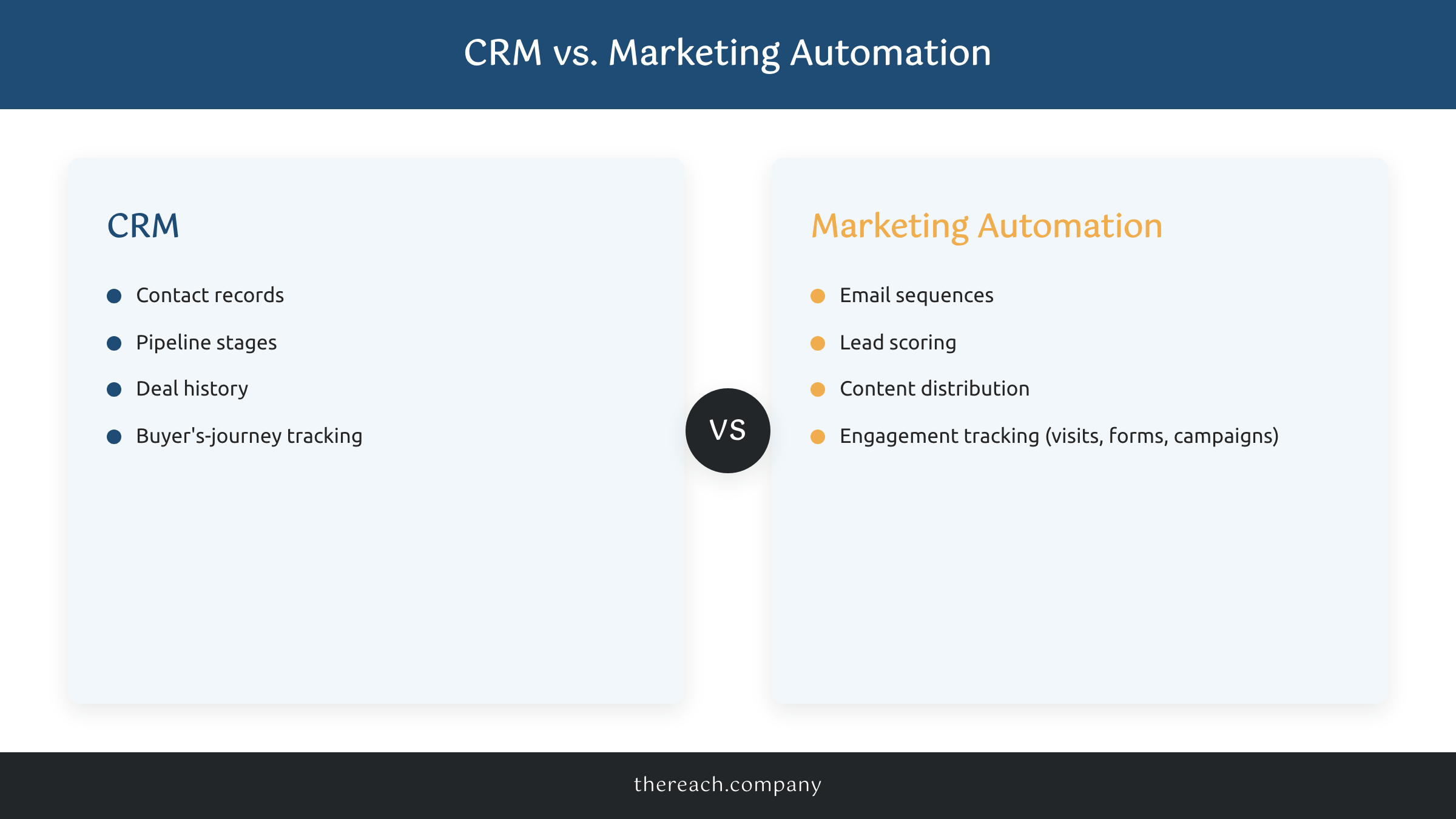
A CRM (customer relationship management) software handles contact records, pipeline stages, deal history, and the full arc of each customer’s buyer’s journey. It’s the system of record. Every phone call, every quote you sent, every “call me back in two weeks” lives there. Tools in this lane: HubSpot CRM, Salesforce, Pipedrive, and the CRM built into GoHighLevel.
Marketing automation software handles triggering email sequences, scoring leads based on behavior, distributing content, and tracking engagement across website visits, form fills, and campaign touchpoints. It’s the system that acts without you clicking send every time. Tools in this lane: Mailchimp, ActiveCampaign, Klaviyo, HubSpot Marketing Hub, and GoHighLevel’s workflow builder.
That’s not my framing, that’s straight from HubSpot’s own breakdown of why CRM and marketing automation need each other, and HubSpot sells both, so they have no reason to blur the line for you. Their data backs up why the split matters: 52% of marketers now prioritize platforms where CRM and marketing automation are natively unified, and businesses that integrate the two see lead response times up to 30% faster. Speed to lead isn’t a nice-to-have. It’s close to the whole game.
We wrote a full breakdown of the best CRM options for a service business if you want to go deeper on that half of the equation specifically.
The Contrarian Truth
Here’s the part most articles on this topic won’t say plainly: if you’re a service business under $1M in revenue with one or two people touching the pipeline, you almost never need to buy a CRM and a marketing automation platform as two separate purchases. Buying them separately is a scaling decision, not a starting decision.
Vendors blur this line on purpose because confusion sells upgrades. But GoHighLevel, Keap, and a handful of others exist specifically because most small businesses need one system, not two data sources that have to be kept in sync by hand. When your CRM and your automation live in different platforms, somebody has to manually make sure a closed deal in the CRM stops the automated nurture email still going out in the other tool. That’s not a hypothetical. I’ve watched a business owner apologize to a client for getting a “still interested?” email three days after signing the contract, because nobody told the automation tool the deal had closed.
Split them apart later, once you have a dedicated marketing hire drowning in campaign complexity a basic CRM workflow was never built to handle. Until then, unify first.
Proof
The 5-minute rule is the clearest argument for why this matters more than which logo is on the software. Leads contacted within 5 minutes convert at roughly 21%, compared to 2.3% for leads contacted the next day, according to industry response-time research. Most businesses take an average of 42 hours to respond to a new lead. Only about 7% respond inside that 5-minute window.
That gap isn’t an effort problem, it’s a systems problem. A business owner juggling calls, quotes, and job sites can’t personally hit every lead in 5 minutes. A unified CRM-plus-automation system can. We set up GoHighLevel for every client we take on for exactly this reason: a missed call triggers an instant text back, a form fill triggers a same-minute confirmation email, and the lead lands in the pipeline stage where a real human picks it up next. No manual handoff between “the tool that knows who they are” and “the tool that knows what to send them,” because it’s the same tool.
What to Do Instead
Skip the “which software category” debate and ask which stage you’re actually in.
Under $1M in revenue, one to three people on the pipeline: get a unified system. This is where The Reach Co Lead System comes in: we build it on GoHighLevel because CRM, SMS/email automation, and lead capture live in one $299/month platform instead of three subscriptions arguing with each other.
You already have a CRM but zero automation: don’t rip anything out. Bolt on a lightweight automation tool like Mailchimp or ActiveCampaign for email sequences and lead scoring, and connect it to your existing CRM with native integrations before you consider a full platform swap.
You have real campaign complexity and a dedicated marketing hire: this is when splitting into a best-in-class CRM plus a dedicated marketing automation platform starts to make sense, because you finally have someone whose job is to manage that complexity instead of doing it between job-site visits.
It really depends on where your business is today, and that’s an honest answer, not a dodge.
The Bottom Line
You don’t need to solve the CRM vs marketing automation debate in the abstract. You need to know who your leads are and get the right message to them fast, and for most small service businesses, one system does both jobs better than two systems that don’t talk to each other. Start unified. Split later, if and when the complexity actually earns it.
You got this. And if you want a second set of eyes on which setup actually fits your business, that’s exactly the conversation we have on a discovery call.

